Doctor Tracker: Building a Role-Scoped Clinical Administration Web Portal
Doctor Tracker is an open-source clinical administration portal built with Next.js 16, Node.js 22, and MongoDB Atlas. Here is how I engineered its role-scoped data isolation, atomic audit transactions, and 85-point automated browser QA.
In a busy inpatient hospital ward, slow information flow is not just an inconvenience: it is a clinical safety risk. When a patient's condition changes at 2:00 AM, the care team cannot afford to spend minutes cross-referencing outdated spreadsheets, calling around to see which doctor is responsible, or guessing whether the on-duty specialist is already overloaded.
Despite heavy investment in hospital enterprise software, daily floor coordination often ends up on brittle spreadsheets and informal chat groups. That creates three immediate problems: doctors get overloaded without warning, patient handoffs between shifts lose critical context, and sensitive patient records risk leaking across unmonitored tools.
To solve this, I designed, built, and open-sourced Doctor Tracker: a clean, role-scoped healthcare administrative portal built with Next.js 16, Node.js 22, Express, and MongoDB Atlas.
👉 Explore the project on GitHub: github.com/mmhfarooque/doctor-tracker
👉 Try the live demo: doctor-tracker-three-gamma.vercel.app
Design Principles: Clear Clinical Information Over Visual Clutter
Before writing code, I set three design rules for the interface:
1. Color is clinical status, never decoration
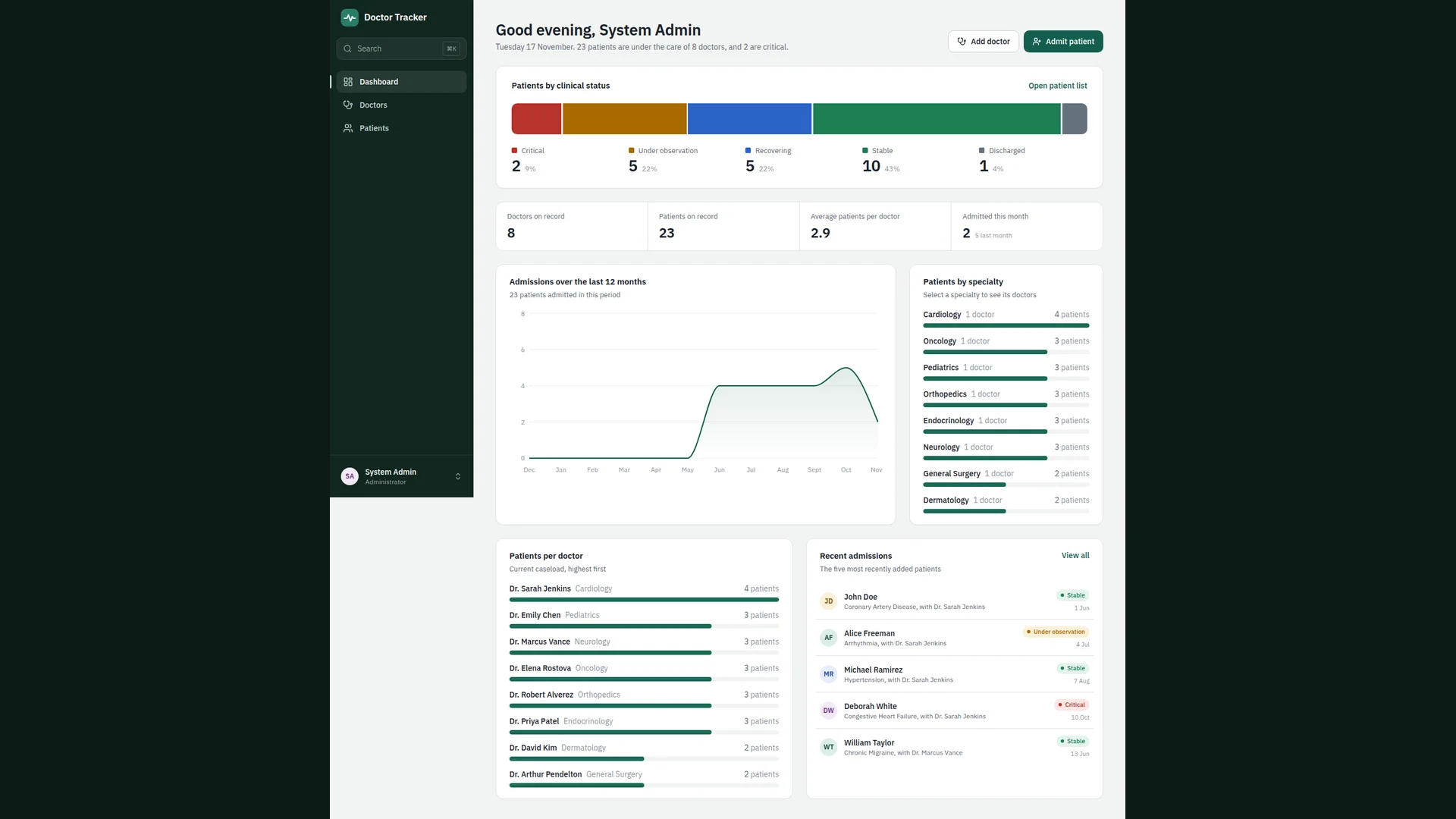
Consumer apps use bright accent colors to look engaging. In clinical software, decorative colors cause alert fatigue. I reserved saturated semantic colors strictly for the five inpatient stages:
- Critical (Red): Immediate physician attention needed.
- Under Observation (Amber): Continuous monitoring and regular vitals required.
- Recovering (Blue): Showing positive clinical progress.
- Stable (Green): Standard ward care.
- Discharged (Slate): Cleared and archived; used for average length of stay (ALOS) metrics.
The rest of the interface uses a muted Deep Pine (#112620) and dark slate palette. When a patient turns critical, that red badge stands out immediately on the screen.
2. Slide-over drawers instead of page jumps
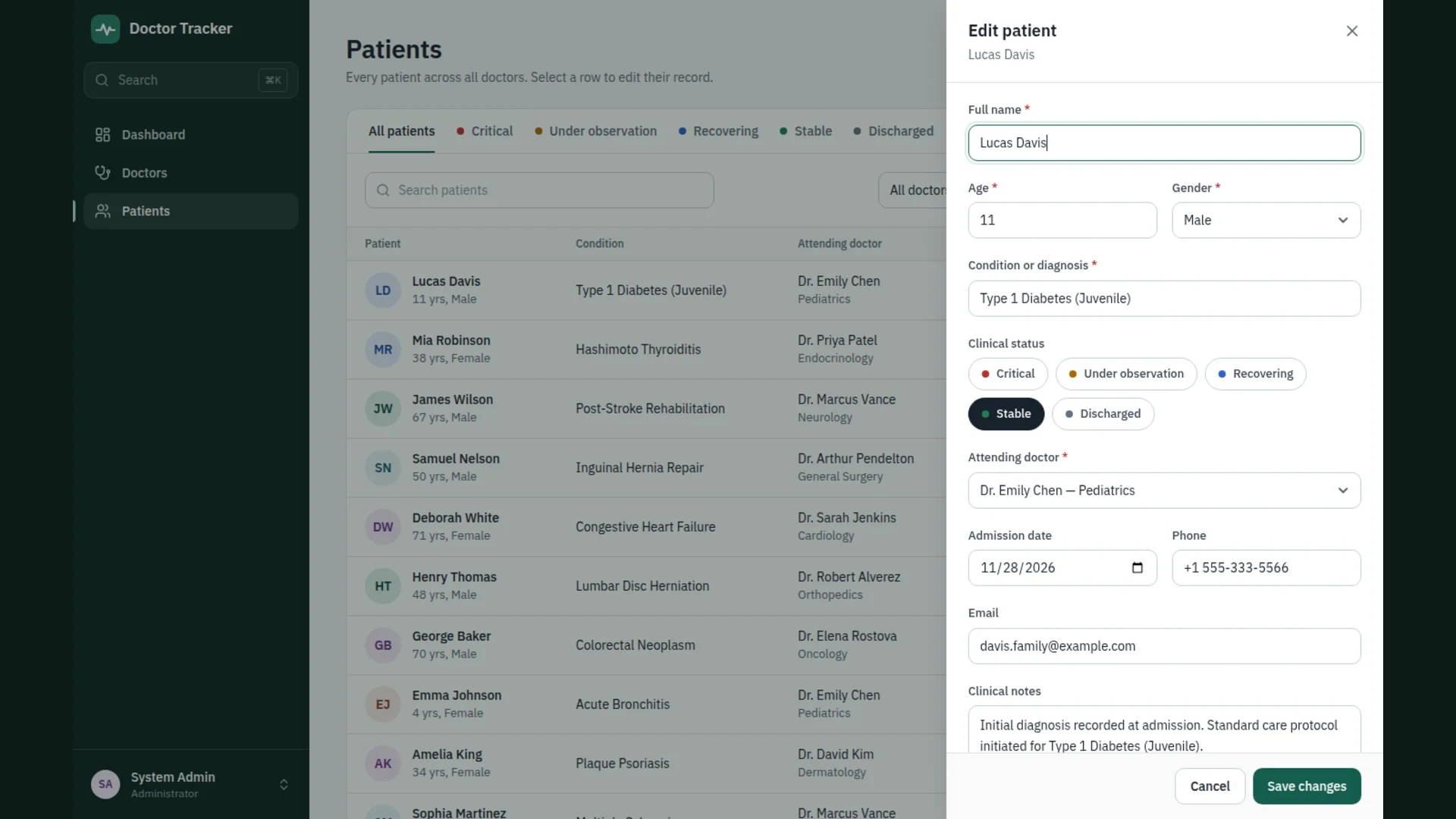
Healthcare workers get interrupted constantly. If a nurse is looking at a ward list of 40 patients and clicks to update a note, sending them to a new page loses their scroll position and visual context. In Doctor Tracker, all operational actions (admissions, transfers, shift creation, and editing notes) open in a right-hand slide-over drawer. The table stays visible behind the form, and closing the drawer brings the user right back to where they were.
3. Quick keyboard navigation with Ctrl+K
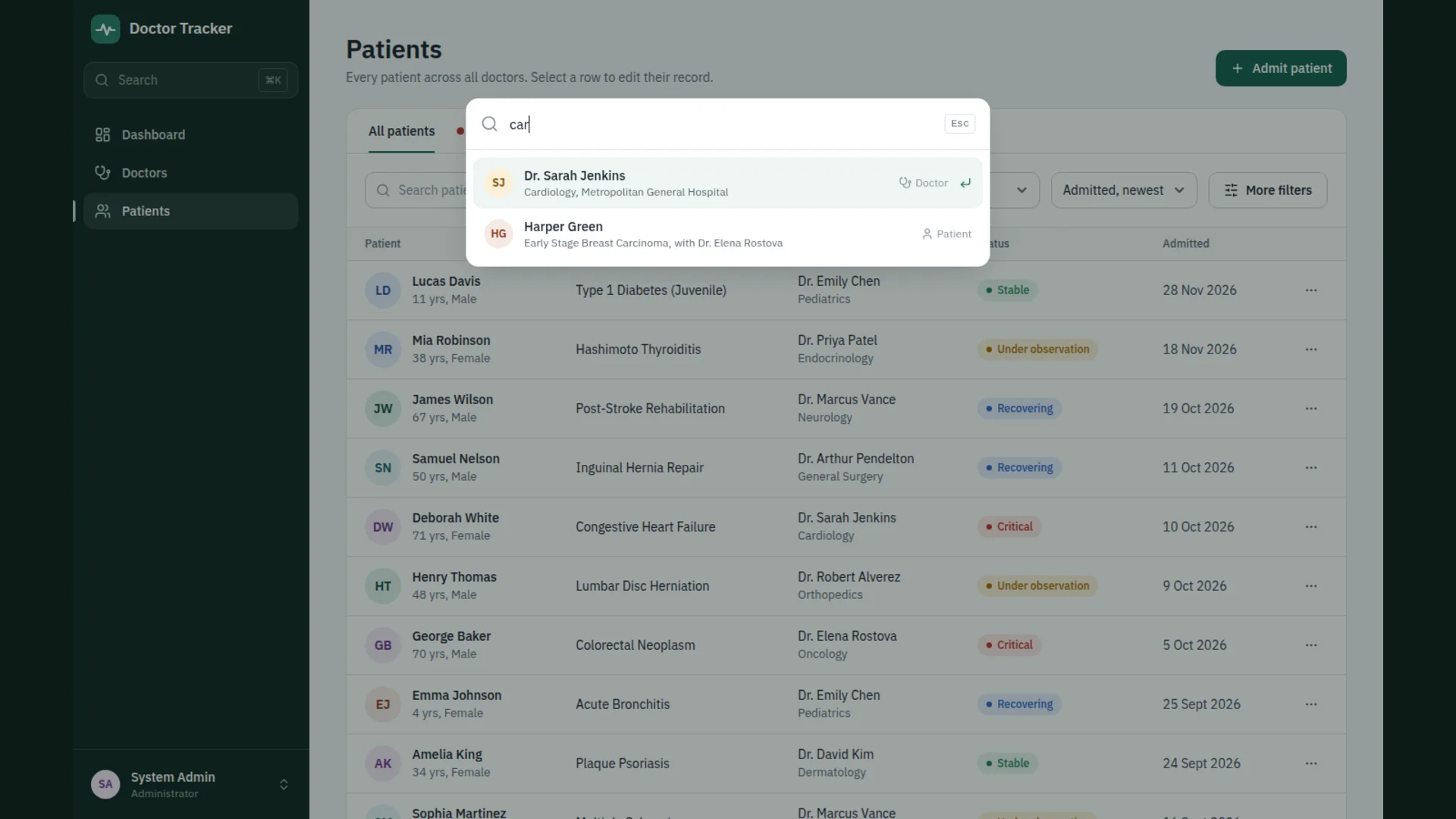
Looking up records should not require clicking through multi-level menus. Pressing Ctrl + K (or Cmd + K on macOS) opens a command palette that indexes doctors and patients in real time. Ward managers can jump directly to any patient record or physician roster in a few keystrokes.
System Architecture: Why a Standalone Backend?
Doctor Tracker uses a decoupled architecture with a Next.js 16 frontend and a standalone Node.js 22 / Express REST API connected to MongoDB Atlas.
While Next.js route handlers work well for simple websites, a clinical application benefits from a dedicated API tier for three practical reasons:
- Reliable database connection pooling: Serverless functions spin up and down unpredictably, which can exhaust database connection pools during busy hospital shifts. A dedicated Node.js service maintains a persistent connection pool to MongoDB.
- Separation of heavy aggregation queries: Computing real-time admission trends, average length of stay (ALOS), and departmental caseload distributions requires complex MongoDB aggregation pipelines. Running these queries in a separate process keeps SSR page generation fast and responsive.
- Deployment flexibility: The backend can run as an auto-scaling container on Render, a private VM, or an internal on-premise server within a hospital network.
Core Features Built for Everyday Ward Operations
Live Ward Census Bar
At the top of the dashboard, the Ward Census Bar visualizes the proportion of patients in each clinical state. Clicking any section (such as the red Critical segment) filters the patient list to /patients?status=Critical with one click.
Physician Caseload and Capacity Safeguards
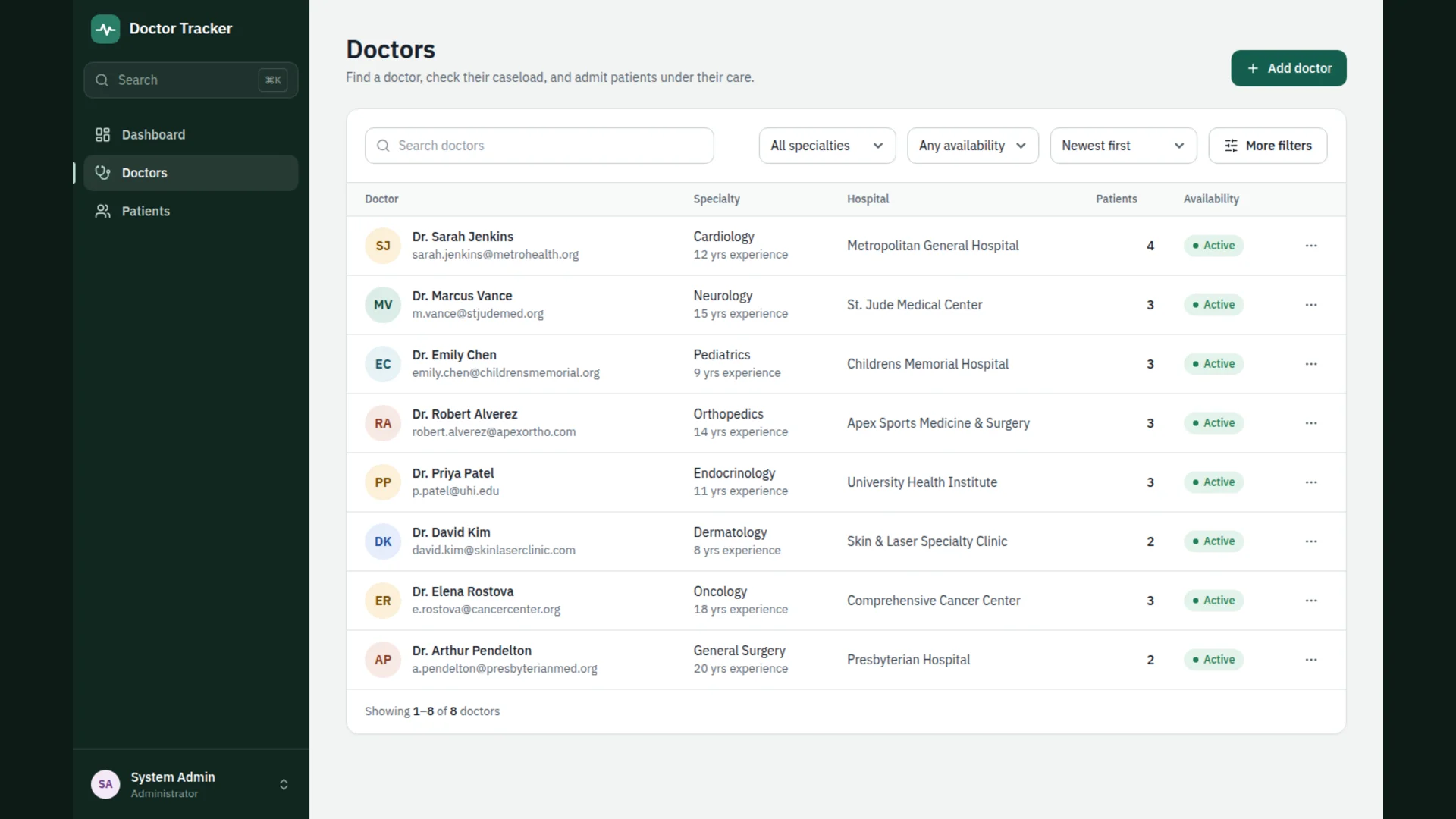
Every doctor profile defines a maximum caseload limit (maxPatients) and tracks active patients in real time. A color-coded capacity meter shows green under 80%, amber near capacity, and red when full. The system warns administrators before transferring new patients to an overloaded physician.
Audited Patient Transfers with Mandatory Reasons
Transferring a patient between attending physicians requires selecting an eligible doctor and entering a clinical reason. The transfer and the audit event are committed together, recording who authorized the move, when it occurred, and why.
Clash-Proof Duty Shifts
The duty roster manages Day, Night, and On-Call shifts over a 7-day view. When adding a shift, the backend verifies that the doctor does not already have an overlapping assignment:
const clash = await Shift.findOne({
  doctor: doctorId,
  date: shiftDate,
  $or: [{ startTime: { $lt: endTime, $gt: startTime } }, { endTime: { $gt: startTime, $lt: endTime } }]
});
if (clash) return res.status(409).json({ message: "Physician already has an active shift during this window" });
Doctors currently on duty receive an active indicator on the dashboard, making it easy to confirm who is on the ward right now.
Multi-Role Scoping (Admin, Doctor, Nurse)
The portal enforces role-based access control (RBAC) at the API query level:
- Administrator: Full system oversight, shift scheduling, staff account creation, and record management.
- Attending Doctor: Sandboxed access. The API automatically filters patient queries by
{ doctor: req.user.doctor }. Doctors cannot access or view patients assigned to colleagues. - Floor Nurse: Fast triage mode. Nurses can view ward lists, update clinical status pills, record notes, and schedule follow-ups, but cannot delete records or reassign staff.
Security Hardening: 10 Vulnerabilities Identified and Fixed
Before deploying, I put Doctor Tracker through a thorough line-by-line security review. Here are five of the most important fixes implemented:
1. Eliminating Patient Info Leakage in Server Logs
Standard Express error handlers often log raw error objects. When a validation or cast error occurred, unencoded request paths or clinical inputs were getting printed to server log files. I updated the error logging middleware to record fixed route templates and sanitized error codes, preventing patient identifiers from appearing in server logs.
2. Revoking Activity Feed Access After Transfers
Previously, when Doctor A transferred a patient to Doctor B, Doctor A's activity feed continued showing new clinical updates for that patient. I updated readActivity() to cross-check current active assignments. The moment a transfer completes, the previous physician's access to new timeline entries for that patient is immediately revoked.
3. Atomic Auditing via MongoDB Transactions
In early testing, patient updates and audit records were saved in separate database calls. If the audit call failed, the patient mutation remained saved without an audit log. I wrapped all patient mutations in multi-document transactions:
export const withAuditTransaction = async (req, operation) => {
  const session = await mongoose.startSession();
  session.startTransaction();
  try {
    const result = await operation(session);
    await session.commitTransaction();
    return result;
  } catch (error) {
    await session.abortTransaction();
    throw error;
  } finally {
    session.endSession();
  }
};
If the audit record cannot be written, the entire mutation rolls back automatically.
4. Distributed MongoDB Rate Limiter with TTL
Standard in-memory rate limiters reset whenever serverless containers recycle. I implemented a custom store (MongoRateLimitStore) backed by MongoDB. Every incoming request atomically increments a counter with an automatic 15-minute TTL expiration index. Authenticated staff receive 1,500 requests per 15-minute window, while unauthenticated traffic is capped at 300 requests per IP.
5. Preventing CSV Formula Injection
When administrators export patient rosters to CSV, values starting with formula characters (=, +, -, @) could execute commands when opened in spreadsheet software like Excel. I added a sanitization pass that prepends an apostrophe to any cell starting with those characters, neutralizing formula execution.
Automated Testing: 134 Automated Checks
To keep the application stable across updates, the test suite combines backend integration tests with end-to-end browser automation:
- 49 Backend Integration Tests (using Node's native
node:testrunner) testing authentication, RBAC boundaries, shift conflict detection, and audit transactions. - 85 Headless Browser QA Checks (using Puppeteer) driving realistic user workflows in Chromium.
The Puppeteer suite tests viewports from 320px mobile screens to 1920px desktops, verifies tap target sizing (minimum 24px), injects XSS payloads into input fields to verify DOM escaping, and tests network failure recovery by intercepting API responses.
Try the Live Demo
You can test Doctor Tracker directly using these demo accounts (password for all: Password123!):
| Role | Workflows to Test | |
|---|---|---|
| Administrator | [email protected] | Duty rosters, staff management, caseload reassignments, and CSV export. |
| Attending Doctor | [email protected] | Dr. Sarah Jenkins: only her assigned cardiology patients are visible; other records are locked. |
| Floor Nurse | [email protected] | Nina Patel: update patient status pills, log progress notes, and adjust follow-ups. |
Links:
- Frontend Portal: doctor-tracker-three-gamma.vercel.app
- API Health Endpoint: doctor-tracker-api-tawny.vercel.app/health
- Source Code: github.com/mmhfarooque/doctor-tracker
Frequently Asked Questions
What is Doctor Tracker?
Doctor Tracker is an open-source clinical administration portal for hospital wards. It helps administrators manage physician caseloads, track patient clinical stages, handle transfers with mandatory audit logs, and organize duty rosters without spreadsheets.
What technologies does it use?
The frontend is built with Next.js 16 and React 19 using Tailwind CSS. The backend is a standalone Node.js 22 and Express REST API connected to MongoDB Atlas via Mongoose 8.
How does role scoping work for doctors?
Doctors only see patients assigned directly to them. The backend injects the authenticated doctor's ID into database queries, so direct URL manipulation or API requests for another doctor's patients return a 404 response.
Why use a standalone Express backend instead of Next.js server actions?
A standalone backend maintains persistent connection pooling with MongoDB Atlas, prevents heavy aggregation pipelines from competing with page rendering, and allows deploying the API independently in containerized or on-premise hospital environments.
Is Doctor Tracker open source?
Yes. The full codebase including backend, frontend, security utilities, and browser QA test suite is available under the MIT license on GitHub.
Conclusion
Building Doctor Tracker reinforced a clear lesson: clinical software needs to be quiet, predictable, and strictly audited. Keeping visual decoration minimal lets important status changes stand out, and backing mutations with database transactions ensures medical histories stay accurate.
If you are working on healthcare tools, multi-role web portals, or decoupled Next.js/Node architectures, feel free to inspect the repository, fork the project, or reach out with feedback.