Tumbleweed + NVIDIA: Update the Kernel and Driver Together, Safely
A new Tumbleweed kernel can arrive before its NVIDIA driver and leave you with a black screen. Here is why it happens and the free open-source update-everything script that updates the kernel and driver together, or not at all.
If you run openSUSE Tumbleweed on a PC with an NVIDIA graphics card, you may have met this one: you run a normal update, reboot, and get a black screen, a stretched low-resolution desktop, or a system where nvidia-smi suddenly says there is no driver.
It happened to me on 18 November 2026. Nothing was really broken. The new Linux kernel had simply arrived before the NVIDIA driver built for it. In this post I explain why that happens, then show the small open-source tool I wrote so it can't happen again. It's one command, update-everything, that updates the whole PC and only moves the kernel and the NVIDIA driver together.
👉 Get it on GitHub: github.com/mmhfarooque/tumbleweed-nvidia-update (MIT license, plain bash, no extra dependencies)
The problem: three pieces that must match
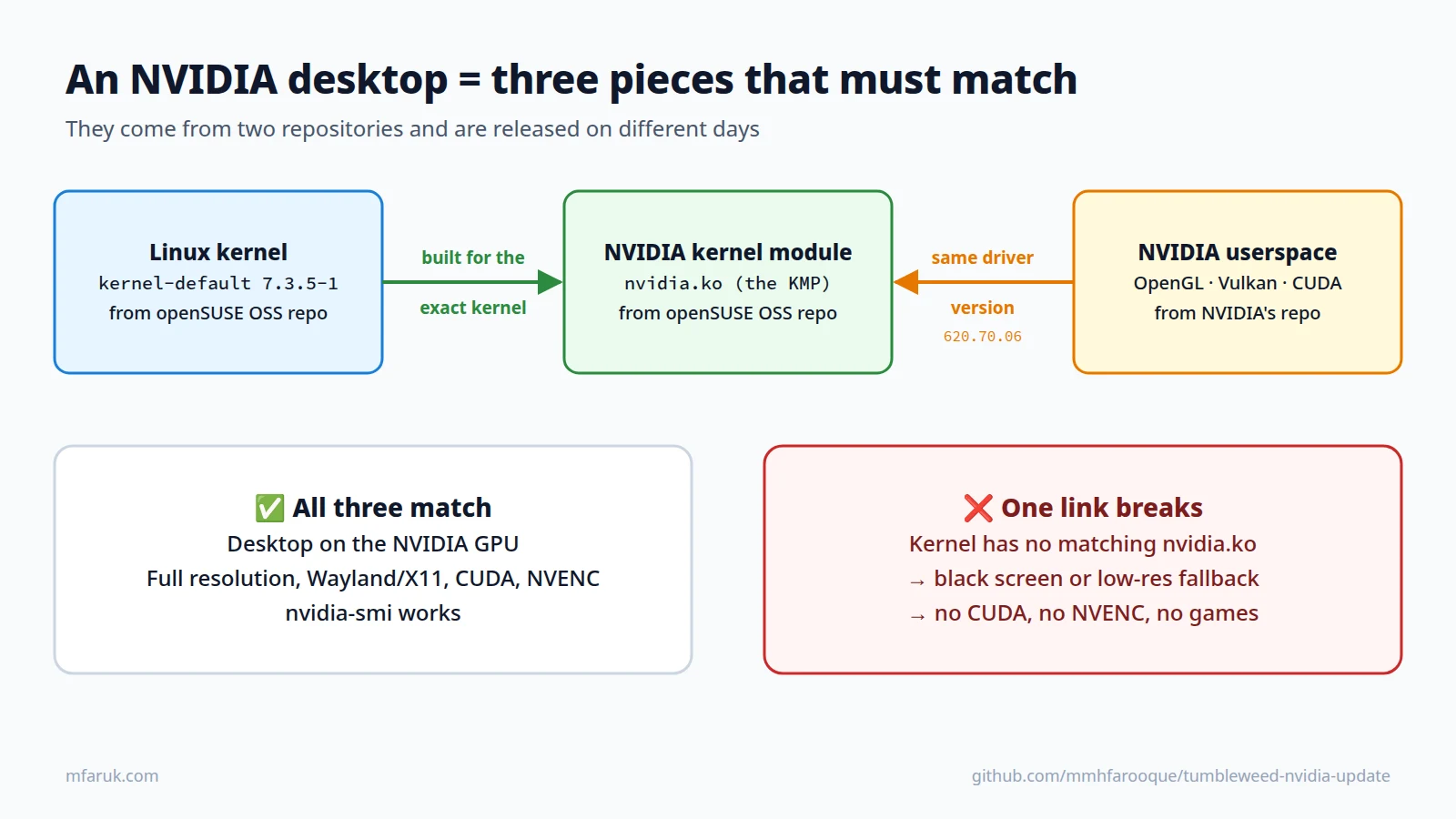
A working NVIDIA desktop on Tumbleweed is really three separate pieces:
- The Linux kernel (
kernel-default), from the openSUSE OSS repository. - The NVIDIA kernel module (
nvidia.ko), shipped as a KMP package such asnvidia-open-driver-G07-signed-kmp-default, also from openSUSE. It is compiled and signed for one specific kernel version. - The NVIDIA userspace: the OpenGL, Vulkan, CUDA and video libraries (
nvidia-gl-G07,nvidia-compute-G07…), which come from NVIDIA's own openSUSE repository.
The left link in the diagram says the module must be built for the exact kernel you boot. The right link says the libraries must be the same driver version as the module. If either link breaks, the NVIDIA driver can't load. You end up on a fallback display driver (or a black screen) with no CUDA, no hardware video encoding and no gaming performance.
Why it breaks on a rolling release
Tumbleweed is a rolling release, and that's its strength: new kernels arrive within days of upstream. But the kernel and the NVIDIA module are built and published separately. For a while there can be a new kernel in the repository with no NVIDIA module built for it yet. A plain sudo zypper dup doesn't know or care. It installs the new kernel, makes it the default, and the next boot has no NVIDIA driver.
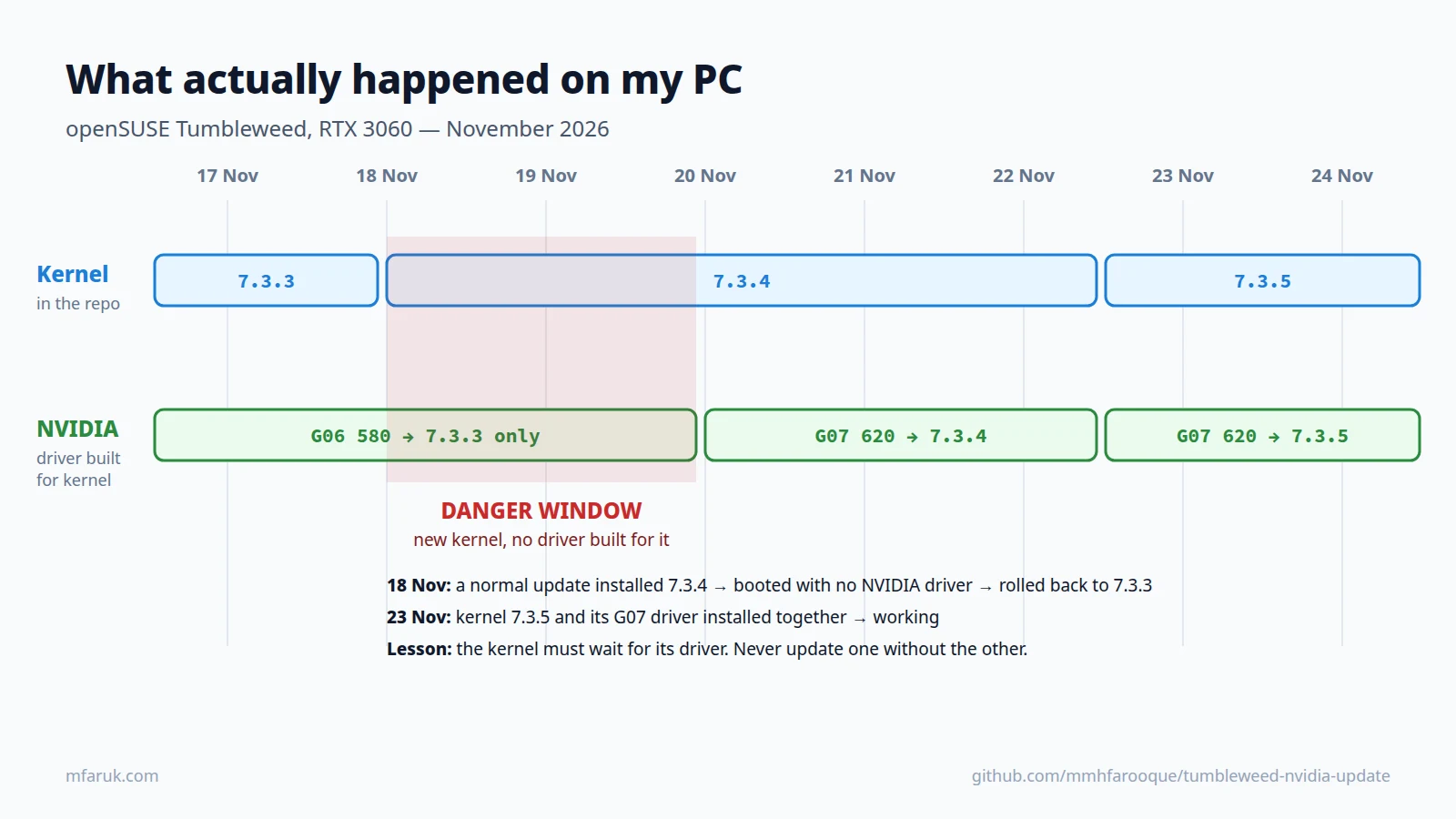
This is exactly what happened on my machine (RTX 3060):
- Before 18 Nov: kernel 7.3.3 with the G06 driver 580, which was built only for 7.3.3.
- 18 Nov: a routine update installed kernel 7.3.4. There was no G06 driver built for 7.3.4, so the next boot had no NVIDIA driver. I booted back into 7.3.3 and locked the kernel.
- 20 Nov: the newer G07 driver (620.70.06) was available for 7.3.4, so I planned the move to G07.
- 23 Nov: kernel 7.3.5 and the G07 driver built for 7.3.5 were installed together, and everything worked.
The lesson is simple: the kernel has to wait for its driver. Never update one without the other.
How to tell which kernel a driver was built for
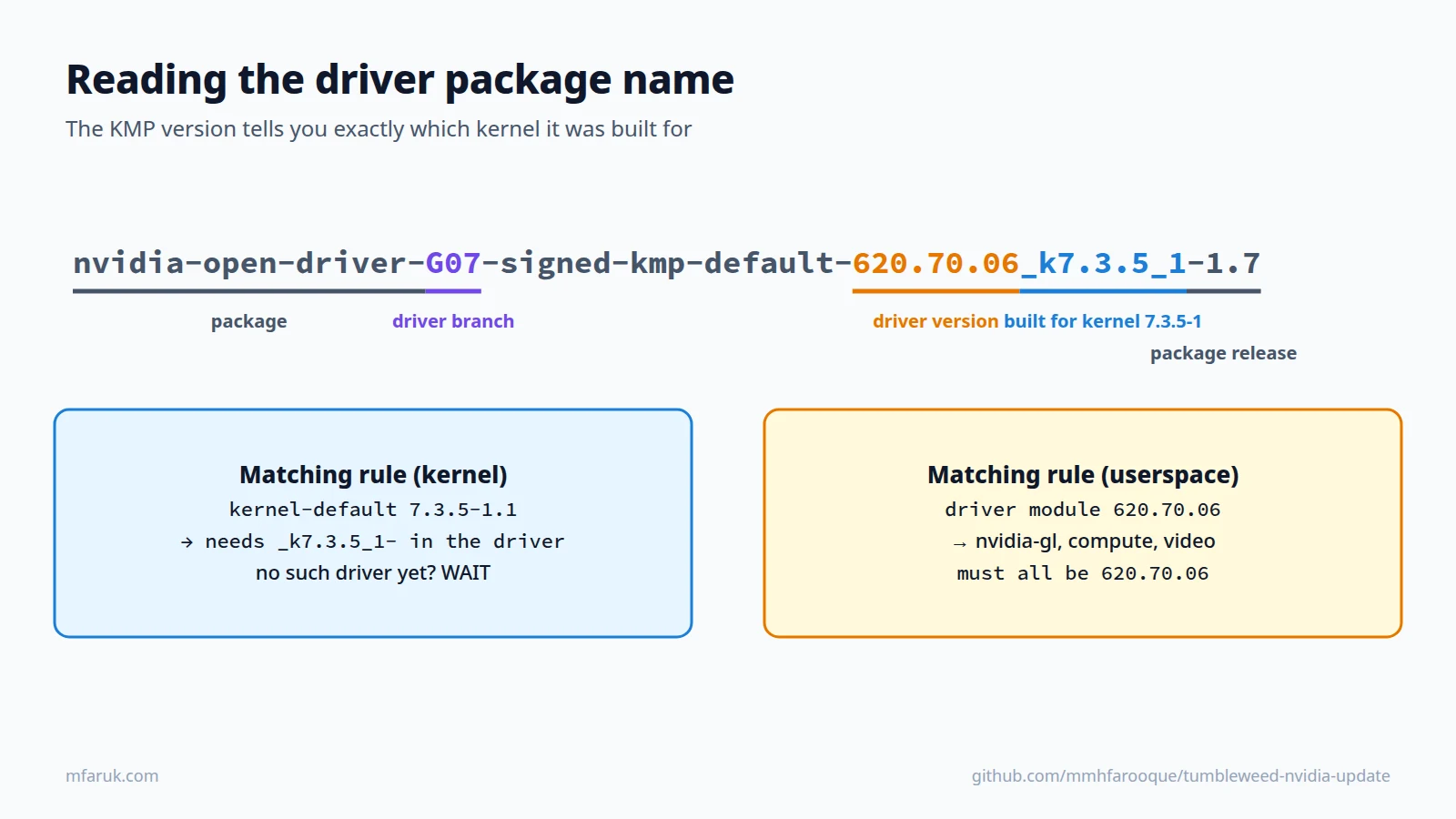
The good news: openSUSE puts the answer right in the package version. Take nvidia-open-driver-G07-signed-kmp-default-620.70.06_k7.3.5_1-1.7:
G07is the driver branch (G06 and G07 are the current open-module branches).620.70.06is the NVIDIA driver version._k7.3.5_1means built for kernel 7.3.5-1.-1.7is the package release.
So the rules a safe updater has to follow are easy to check by machine. For kernel 7.3.5-1.1, there must be a driver whose version contains _k7.3.5_1-. For that driver version 620.70.06, every NVIDIA userspace package must also be 620.70.06. If either is missing, the answer is: wait.
The fix, part 1: lock the pair, update everything else
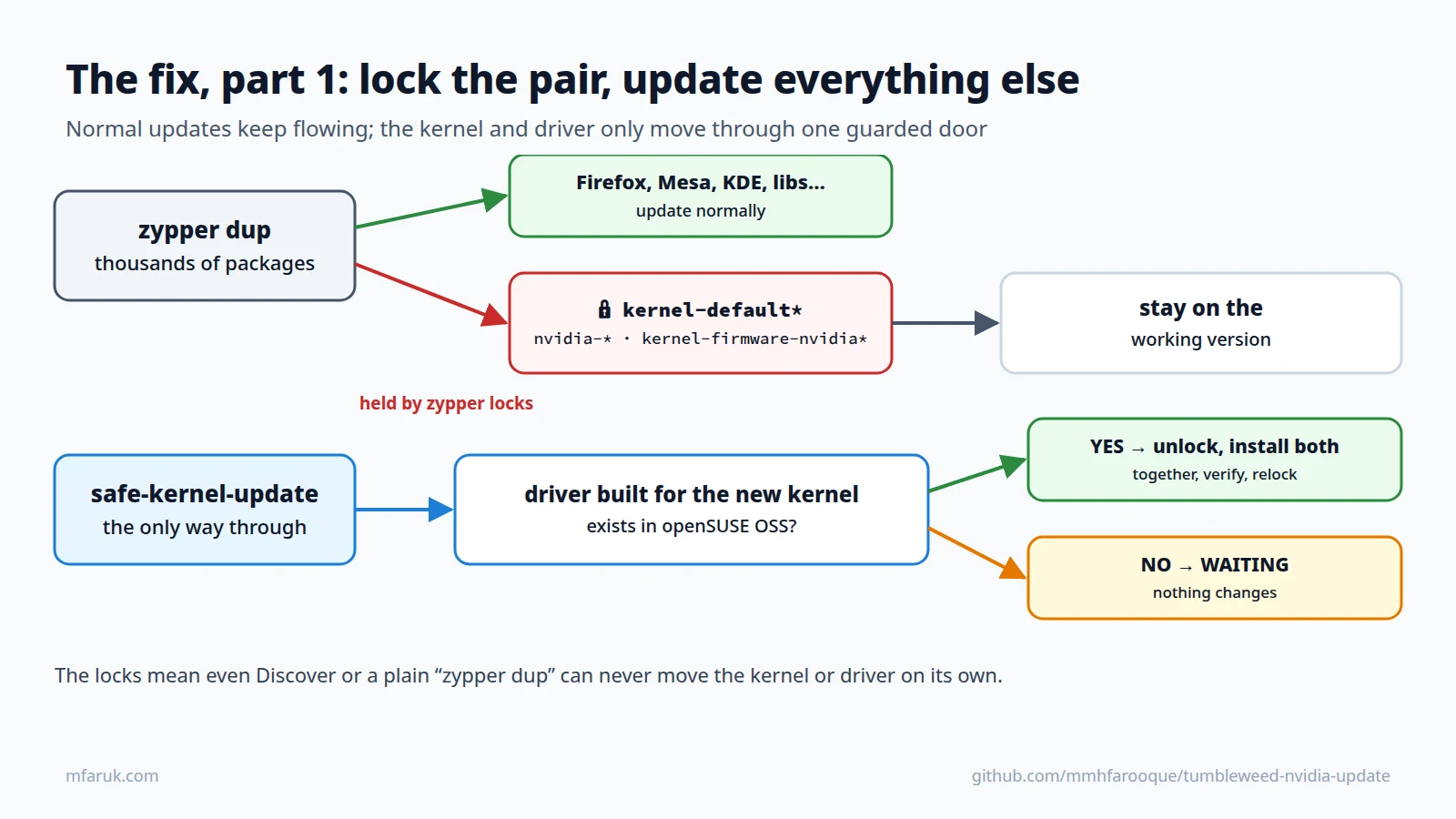
The first part of the strategy uses a standard zypper feature: package locks. The tool locks kernel-default*, nvidia-* and kernel-firmware-nvidia*. From then on, zypper dup, Discover or YaST update thousands of packages as usual (Firefox, Mesa, KDE, libraries), but they can't move the kernel or the driver. Those stay on the working version.
The only way through is a second script, safe-kernel-update. It briefly lifts the locks, but only when openSUSE has published a driver built for the new kernel. If there isn't one yet, it reports WAITING and changes nothing.
The fix, part 2: when is it safe to move?
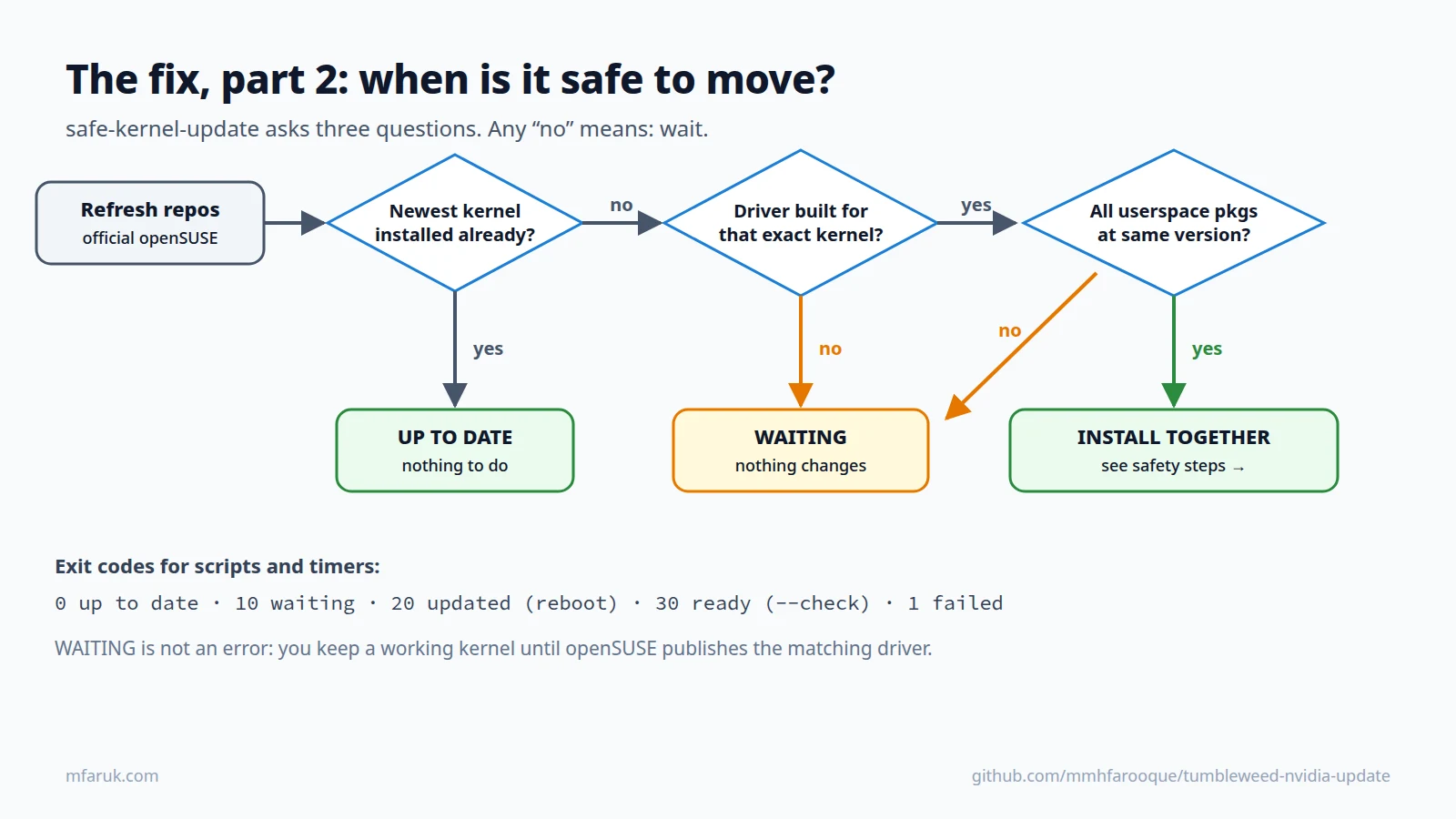
Every time it runs, safe-kernel-update refreshes the official openSUSE repositories and walks through three questions:
- Is the newest kernel already installed? If so, you are UP TO DATE.
- Does the official openSUSE OSS repository have an NVIDIA module built for that exact kernel? If not, the answer is WAITING. The kernel and driver are only taken from the official openSUSE OSS and update repositories, never from a third-party mirror.
- Are all NVIDIA userspace packages available at the same driver version? If not, WAITING again.
Only when all three answers line up does it install the kernel, module and userspace together. WAITING isn't an error. You keep a fully working PC until openSUSE catches up, and the next run picks it up automatically. Each result has its own exit code (0, 10, 20, 30 or 1), so you can also call it from your own scripts or a timer.
The fix, part 3: a safety net around every install
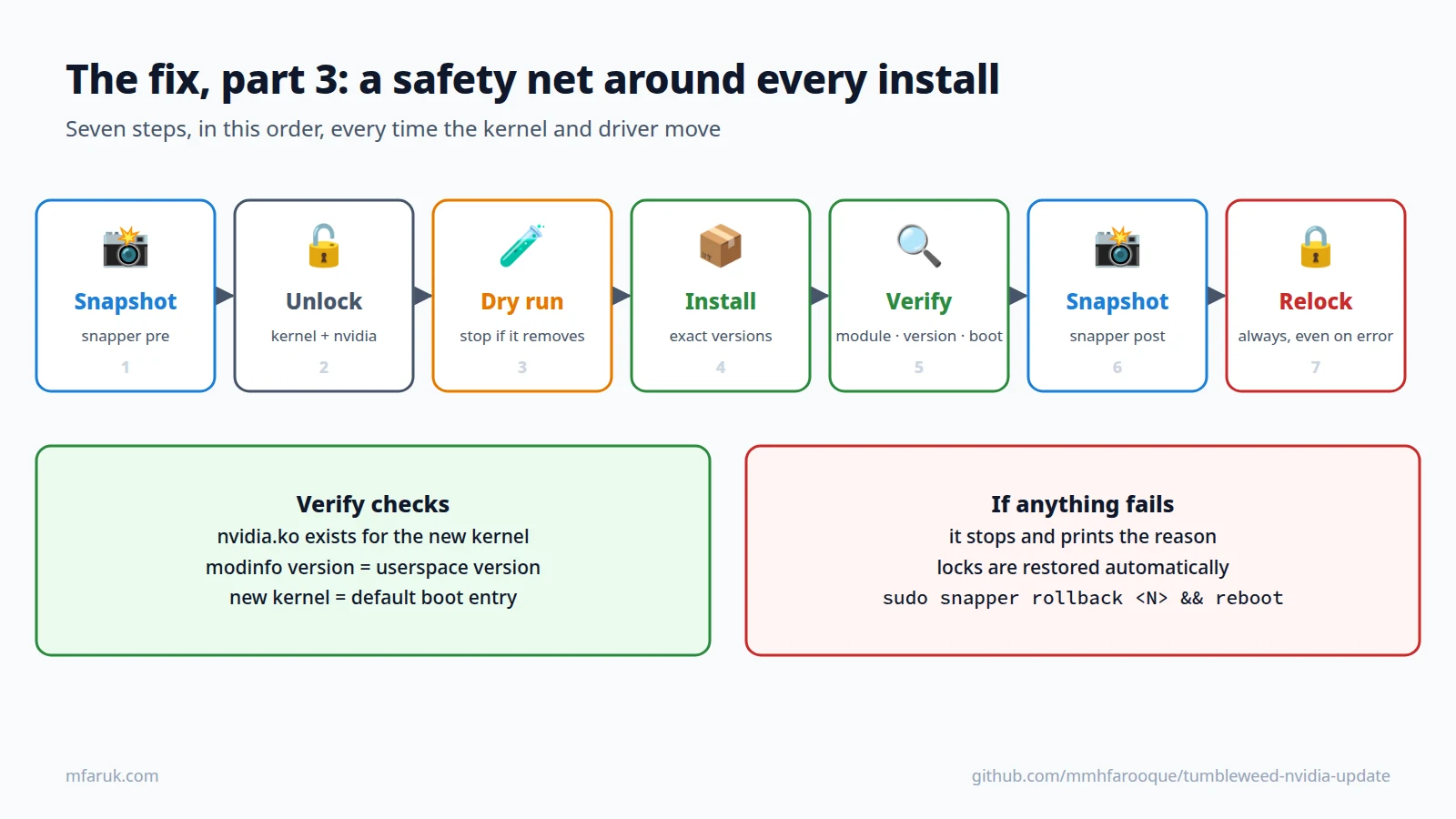
When an update does go ahead, it's wrapped in a safety net:
- Snapshot. A snapper “pre” snapshot of the system, so you can roll back.
- Unlock the kernel and NVIDIA packages.
- Dry run. Zypper simulates the install first. If the simulation fails, or wants to remove any package, it stops and nothing is installed.
- Install the exact versions it checked, nothing more.
- Verify that
nvidia.koexists for the new kernel, thatmodinforeports the same version as the userspace libraries, and that the new kernel is the default boot entry (systemd-boot) or present in the GRUB menu. - Snapshot. A snapper “post” snapshot.
- Relock. The locks always go back, even if something failed halfway.
If any check fails, it prints the reason in plain words, says “do NOT reboot”, and gives you the exact rollback command: sudo snapper rollback <N> && reboot.
update-everything: the whole PC in one command
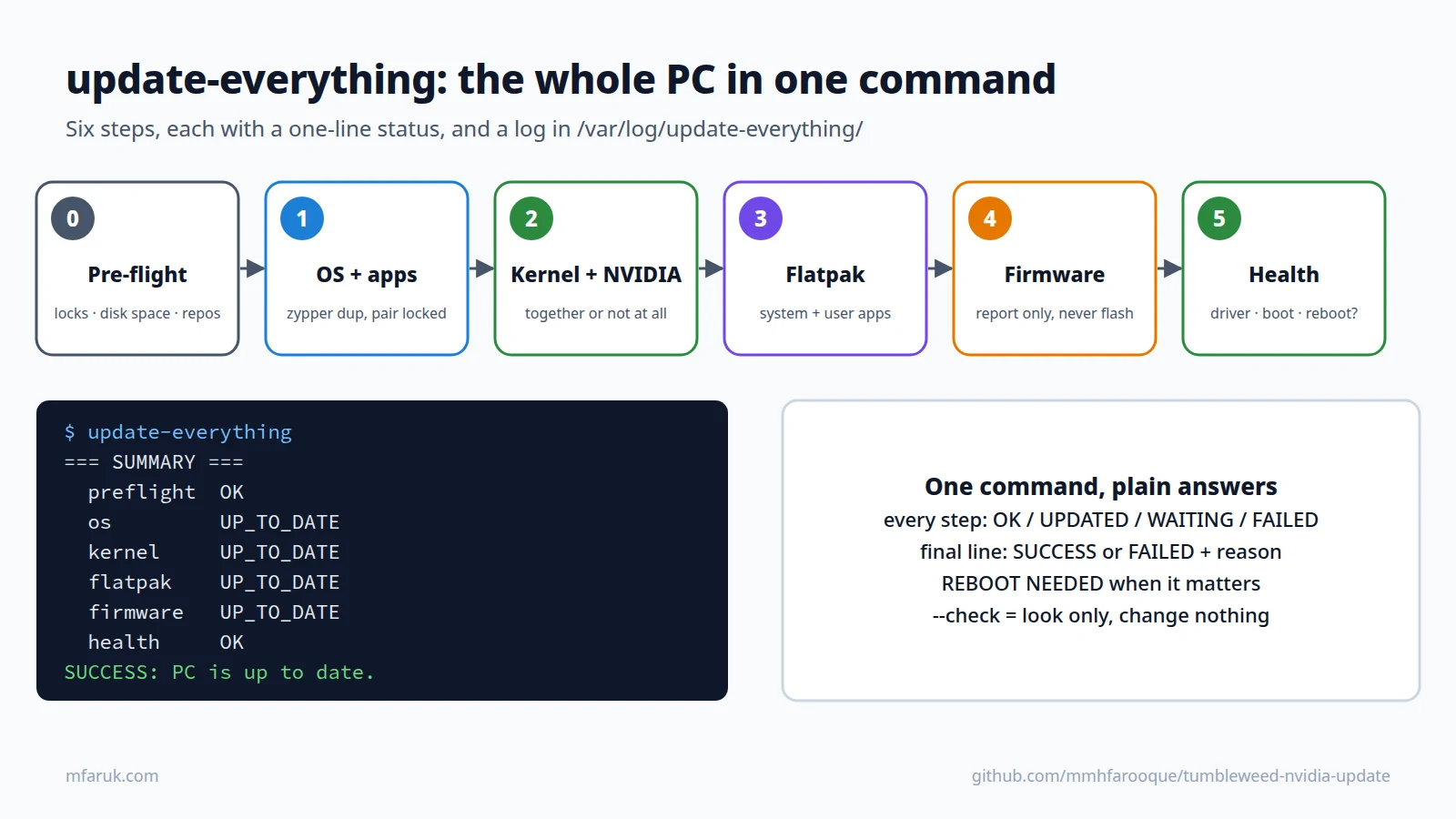
On top of the kernel guard I added update-everything, so the whole PC updates from one command:
- 0. Pre-flight: detects your driver branch (G06/G07) and bootloader, makes sure the locks exist, checks free disk and EFI space, and refreshes the repositories. If a third-party repository is down it warns and carries on; if openSUSE itself is unreachable it stops.
- 1. OS + apps:
zypper dup --no-allow-vendor-change, dry run first, so Packman, Chrome and other third-party packages stay with their own vendor. Afterwards it checks that no locked package changed. - 2. Kernel + NVIDIA: runs
safe-kernel-updateas described above. - 3. Flatpak: updates system and user Flatpak apps.
- 4. Firmware: asks fwupd for BIOS and SSD updates, but only reports them. Flashing firmware is never done automatically.
- 5. Health: confirms the newest kernel has an NVIDIA module with the right version, is the default boot entry, NVIDIA is loaded, the locks are in place, and whether you need to reboot.
Every step prints one status (OK, UPDATED, WAITING or FAILED), and the last line is either SUCCESS or FAILED with the reason. A full log is saved in /var/log/update-everything/. Run it with --check to see what would change without changing anything.
How to install it
git clone https://github.com/mmhfarooque/tumbleweed-nvidia-update.git
cd tumbleweed-nvidia-update
./update-everything --check
The first run asks for your sudo password, copies update-everything and safe-kernel-update to /usr/local/bin, and adds the locks. After that, just type:
update-everything           # update everything safely
update-everything --check   # look only, change nothing
Who can use it
| Your setup | Supported? |
|---|---|
RTX 20 / 30 / 40 / 50 series, GTX 16 series, with openSUSE's nvidia-open-driver-G06/G07-signed-kmp | ✅ Yes |
| GTX 10 series and older (need the proprietary driver from NVIDIA's repo) | ❌ No. It stops with a message and changes nothing |
kernel-longterm, Leap or Slowroll | ❌ No |
To be honest about testing: it has been tested on my own Tumbleweed PC (RTX 3060, G07 driver, systemd-boot), with both --check and a full run. The G06 and classic GRUB paths use the same logic but haven't been tested on real hardware yet. The first real kernel and driver update through the script will happen with the next kernel release. If you try a different setup, please open an issue or a pull request on GitHub with your result.
Why not just use a local AI agent for this?
I first did all of these checks by asking an AI assistant to inspect my system. It worked, but updates are a job where you want the same, predictable answer every time. A short, readable bash script with dry runs, snapshots and explicit checks is more reliable than any model, costs nothing to run, and anyone can read exactly what it does before trusting it.
FAQ
Will this stop me from getting new kernels?
No. It only delays a new kernel until openSUSE publishes the NVIDIA driver built for it. That's usually a matter of days, and it then installs both together.
Can I still use zypper dup or Discover?
Yes. Everything else updates as normal. The locks only hold the kernel and NVIDIA packages, so a plain zypper dup can no longer break the driver.
What if something goes wrong after an update?
The script prints the snapper snapshot number before it changes anything. Run sudo snapper rollback <N> and reboot, or pick the previous kernel in the boot menu.
Does it update my BIOS or SSD firmware?
No. Firmware updates are only reported, with the command to apply them yourself (sudo fwupdmgr update).
How do I remove it?
Delete the two files from /usr/local/bin and remove the locks with sudo zypper rl 'kernel-default*' 'nvidia-*' 'kernel-firmware-nvidia*'.
The project is free and open source under the MIT license. Star it on GitHub if it saves you from a black screen, and let me know how it works on your hardware.